SCOUT Online: Notifications
The Notifications page contains an even log, shown in Figure 1.
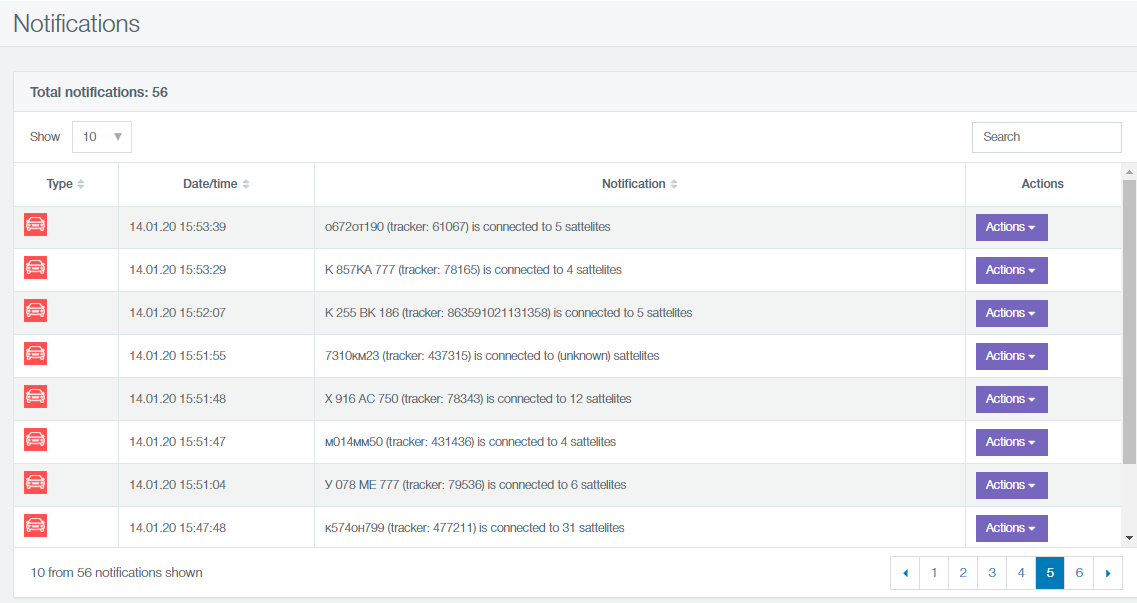
Figure 1 - Event log
It has the following elements:
- information on the total number of notifications and the number (Figure 2);

Figure 2 - The number of notifications
- a table with notifications (see Figure 1), with the columns:
- notification type:
 user notification;
 system notification;
- date/time;
- notification content;
- the column for user notification which contains Report and Track buttons. On clicking the buttons, you will be redirected to the corresponding reports and tracks.
Author: Анисимов Максим Михайлович - Tue, Jan 14, 2020. This article has been viewed 3448 times.
Online URL: https://kb.skai.online/article/scout-online-notifications-3327.html
Powered by PHPKB (Knowledge Base Software)